Mục lục
Trong WooCommerce, mặc định bộ sưu tập (Gallery) sản phẩm chỉ hỗ trợ hiển thị hình ảnh tĩnh. Điều này vô hình trung trở thành rào cản đối với những website đòi hỏi tính trực quan cao như giới thiệu web bán hàng, ứng dụng hay các sản phẩm công nghệ cao. Khách hàng ngày nay không chỉ dừng lại ở việc xem ảnh, họ muốn trải nghiệm sản phẩm “sống” qua những thước phim trailer sinh động ngay tại slide đầu tiên.

Nếu bạn đang sử dụng theme Flatsome và muốn xây dựng một giao diện chuyên nghiệp như dự án Shoppe, bài viết này là dành cho bạn. WEBVIP sẽ hướng dẫn bạn cách “vượt rào” mặc định của WooCommerce bằng bộ code tùy biến cực nhẹ, chuẩn SEO.
Đăng ký dịch vụ thiết kế website chuyên nghiệp tại WEBVIP với ưu đãi và chi phí tiết kiệm nhất.
- Tặng hosting chất lượng cao
- Tặng tên miền .com, .net
- Tối ưu SEO miễn phí
- Tặng kèm chứng chỉ bảo mật SSL
- Hỗ trợ vĩnh viễn
Góp ý, khiếu nại (8h00 – 21h00) - Hotline hỗ trợ 24/7: 0905.331.609 - liên hệ để được tư vấn thêm
Bài viết này sẽ hướng dẫn bạn cách “hack” Gallery mặc định của Flatsome để tích hợp Video chuẩn SEO mà không cần cài thêm Plugin nặng nề.
Tại sao bạn nên tự Code thay vì dùng Plugin?
Việc sử dụng Plugin cho Gallery thường gây ra tình trạng xung đột CSS hoặc làm chậm tốc độ tải trang (PageSpeed). Với một chuyên gia SEO tại Đà Nẵng, việc tối ưu mã nguồn luôn là ưu tiên hàng đầu để đạt Top 1 Google.
-
Tốc độ: Code tối giản, chỉ nạp khi cần thiết.
-
Tùy biến: Tự do điều chỉnh vị trí video (ví dụ: luôn ở đầu slide).
-
Trải nghiệm: Tích hợp sâu vào UX Builder của Flatsome.
Bộ Code Thêm Video Vào Gallery Sản Phẩm WooCommerce trong Flatsome
Dưới đây là toàn bộ mã nguồn bạn cần dán vào file functions.php của Child Theme.
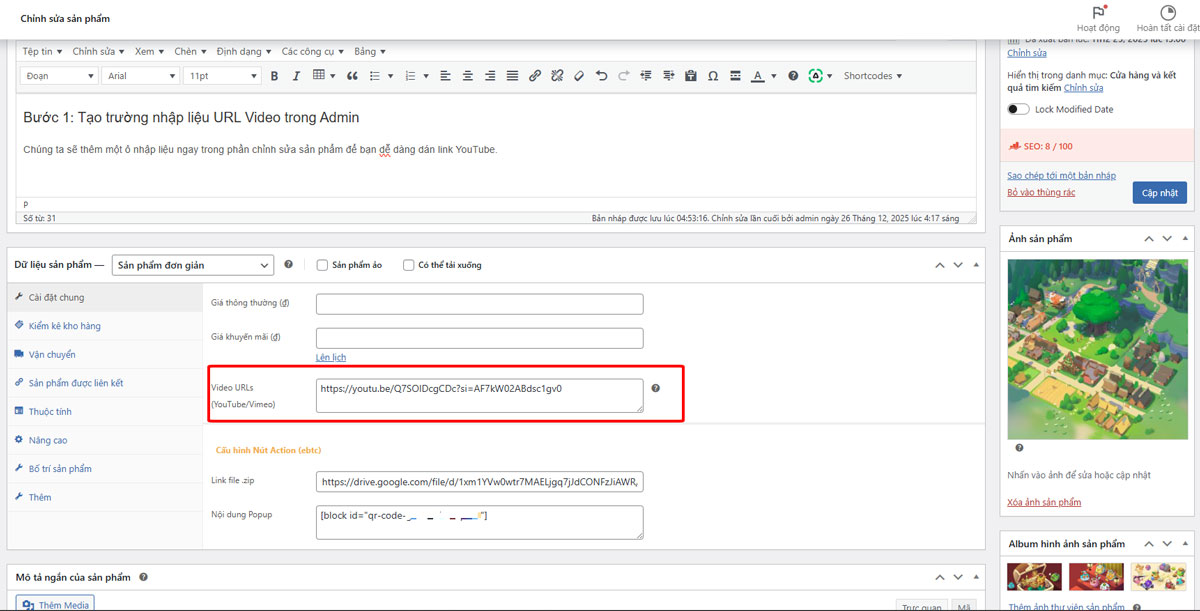
Bước 1: Tạo trường nhập liệu URL Video trong Admin
Chúng ta sẽ thêm một ô nhập liệu ngay trong phần chỉnh sửa sản phẩm để bạn dễ dàng dán link YouTube.
/**
 * 1. TẠO Ô NHẬP LIỆU TRONG ADMIN
*/
add_action( 'woocommerce_product_options_pricing', 'webvip_add_video_field_admin' );
function webvip_add_video_field_admin() {
    woocommerce_wp_textarea_input( array(
        'id'          => '_product_video_urls',
        'label'       => 'Video URLs (YouTube/Vimeo)',
        'description' => 'Nhập link video. Hỗ trợ tự động chạy (Muted) và ẩn nút điều khiển.',
        'desc_tip'    => true,
    ) );
}

add_action( 'woocommerce_process_product_meta', 'webvip_save_video_field_admin' );
function webvip_save_video_field_admin( $post_id ) {
    update_post_meta( $post_id, '_product_video_urls', esc_attr( $_POST['_product_video_urls'] ) );
}
-> Kết quả trong admin khi nhập sản phẩm sẽ xuất hiện ô để nhập đường dẫn video từ Youtube hoặc Video
Bước 2: Hiển thị Video ra Slide và Tối ưu Autoplay
Để video tự động chạy (Autoplay) mà vẫn tuân thủ chính sách trình duyệt, chúng ta cần ép tham số mute=1.
/**
 * 2. HÀM TỰ DỰNG IFRAME ĐỂ ÉP AUTOPLAY & HIDE CONTROLS
 */
function webvip_get_custom_embed($url) {
    $url = trim($url);
    $embed_url = '';

    // Xử lý YouTube
    if (preg_match('/(youtube\.com|youtu\.be)/', $url)) {
        // Tách lấy ID video
        if (preg_match('/[\\?\\&]v=([^\\?\\&]+)/', $url, $matches)) {
            $id = $matches[1];
        } else {
            $id = basename(parse_url($url, PHP_URL_PATH));
        }

        // Tham số: autoplay=1 (tự chạy), mute=1 (tắt tiếng để được phép tự chạy),
        // controls=0 (ẩn thanh điều khiển), rel=0 (không hiện video liên quan), playsinline=1 (chạy tại chỗ trên mobile)
        $embed_url = "https://www.youtube.com/embed/$id?autoplay=1&mute=1&controls=0&rel=0&showinfo=0&iv_load_policy=3&modestbranding=1&playsinline=1&enablejsapi=1";

        return '<iframe src="'.$embed_url.'" frameborder="0" allow="autoplay; encrypted-media" allowfullscreen></iframe>';
    }

    // Xử lý Vimeo
    if (strpos($url, 'vimeo.com') !== false) {
        $id = basename(parse_url($url, PHP_URL_PATH));
        $embed_url = "https://player.vimeo.com/video/$id?autoplay=1&muted=1&background=1";
        return '<iframe src="'.$embed_url.'" frameborder="0" allow="autoplay; fullscreen" allowfullscreen></iframe>';
    }

    return wp_oembed_get($url); // Nếu link khác thì dùng mặc định
}

/**
 * 3. HIỂN THỊ VIDEO VÀO GALLERY
 */
add_action( 'woocommerce_product_thumbnails', 'webvip_display_videos_first', 1 );
function webvip_display_videos_first() {
    global $product;
    $video_urls = get_post_meta( $product->get_id(), '_product_video_urls', true );

    if ( ! empty( $video_urls ) ) {
        $video_array = explode( ',', $video_urls );
        foreach ( $video_array as $url ) {
            $embed_code = webvip_get_custom_embed($url);
            if ( $embed_code ) {
                echo '<div class="woocommerce-product-gallery__image slide is-video-slide">';
                echo '<div class="video-responsive-wrapper">' . $embed_code . '</div>';
                echo '</div>';
            }
        }
    }
}
Bước 3: Tối ưu Giao diện (CSS)
Để các ảnh Thumbnail bên dưới bằng nhau và có icon “Play” chuyên nghiệp giống các dự án game lớn, hãy thêm đoạn code sau:
/**
 * 4. CSS: FIX THUMBNAILS & GIAO DIỆN SẠCH
 */
add_action( 'wp_head', 'webvip_custom_gallery_css' );
function webvip_custom_gallery_css() {
    if ( is_product() ) {
        ?>
        <style>
            a.zoom-button.button.is-outline.circle.icon.tooltip.hide-for-small.tooltipstered {
                display: none;
            }
            /* Khung Video chính */
            .video-responsive-wrapper { position: relative; padding-bottom: 56.25%; height: 0; overflow: hidden; background: #000; border-radius: 8px; }
            .video-responsive-wrapper iframe { position: absolute; top: 0; left: 0; width: 100% !important; height: 100% !important; pointer-events: none; } /* pointer-events: none để tránh người dùng bấm vào iframe làm hiện nút youtube */

            /* THUMBNAILS: Fix các ô bằng nhau */
            .product-thumbnails .col { padding: 4px !important; }
            .product-thumbnails .col a, .product-thumbnails .col img {
                height: 140px;
                width: 100% !important;
                object-fit: cover !important;
                border-radius: 4px;
            }
            @media only screen and (max-width: 48em) {
            /*************** ADD MOBILE ONLY CSS HERE  ***************/
                .product-thumbnails .col a, .product-thumbnails .col img {
                    height: 70px !important;
                }

            }

            /* Icon Play cho Thumbnail */
            .is-video-thumb { position: relative; }
            .is-video-thumb::after {
                content: ''; position: absolute; top: 50%; left: 50%; transform: translate(-50%, -50%);
                width: 25px; height: 25px;
                background: url('data:image/svg+xml;utf8,<svg xmlns="http://www.w3.org/2000/svg" viewBox="0 0 24 24" fill="white"><path d="M8 5v14l11-7z"/></svg>') no-repeat center;
                background-size: contain; z-index: 10; pointer-events: none;
            }
            .is-video-thumb img { filter: brightness(0.8); }
        </style>
        <?php
    }
}

/**
 * 5. JAVASCRIPT: ĐẨY LÊN ĐẦU & RESET SLIDER
 */
add_action( 'wp_footer', 'webvip_gallery_js_pro' );
function webvip_gallery_js_pro() {
    if ( ! is_product() ) return;
    ?>
    <script>
    jQuery(document).ready(function($) {
        var $videoSlides = $('.is-video-slide');
        if ($videoSlides.length > 0) {
            $('.product-gallery-slider').prepend($videoSlides);
        }

        setTimeout(function() {
            var videoUrls = "<?php global $product; echo esc_js(get_post_meta( $product->get_id(), '_product_video_urls', true )); ?>".split(',');

            $('.product-thumbnails .col').each(function(index) {
                var $thumbItem = $(this);
                if (index < $videoSlides.length) {
                    $thumbItem.addClass('is-video-thumb');
                    var url = videoUrls[index].trim();
                    var videoId = url.split('v=')[1] || url.split('/').pop().split('?')[0];
                    if (videoId.includes('&')) videoId = videoId.split('&')[0];
                    var thumbUrl = 'https://img.youtube.com/vi/' + videoId + '/mqdefault.jpg';
                    $thumbItem.find('img').attr('src', thumbUrl);
                }
            });

            $('.product-thumbnails').prepend($('.is-video-thumb'));

            // Quan trọng: Reload lại Slider Flatsome
            $('.product-gallery-slider').flickity('reloadCells');
            $('.product-gallery-slider').flickity('select', 0);
        }, 800);
    });
    </script>
    <?php
}
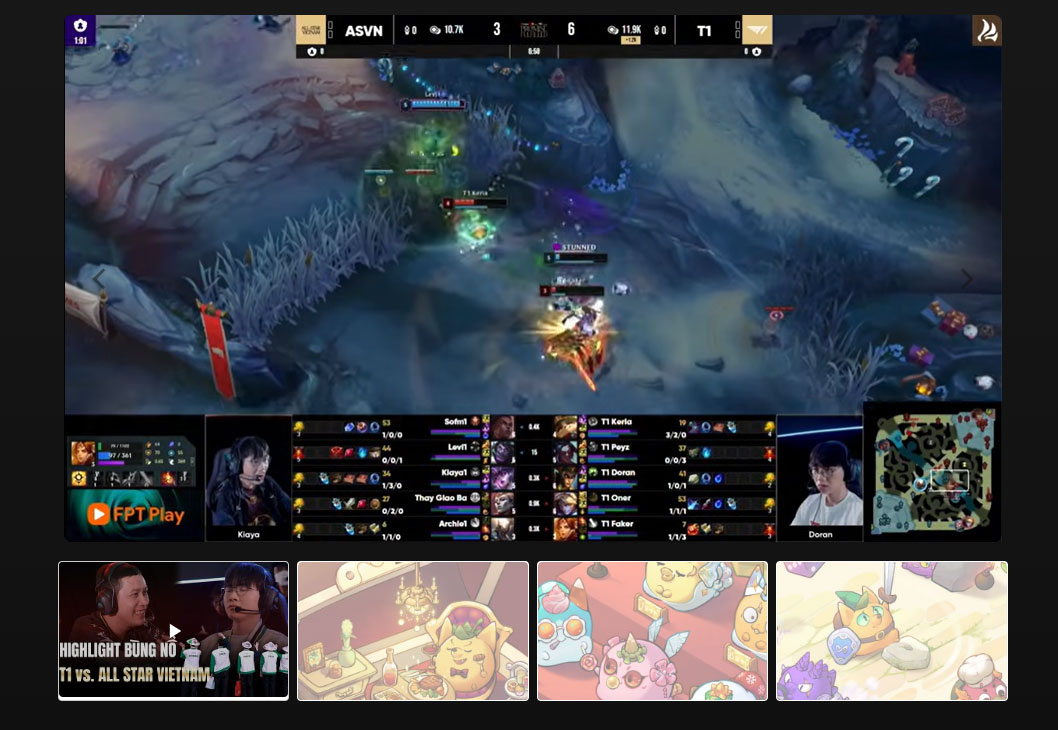
Kết quả Gallery sản phẩm sẽ như mong muốn, Video hiển thị đầu tiên , autoplay. Sau đó là hình ảnh sau video trong gallery.
Kết luận
Việc tích hợp Video Gallery không chỉ giúp trang sản phẩm sinh động hơn mà còn thể hiện sự chuyên nghiệp trong khâu phát triển website. Đối với cộng đồng thiết kế web Đà Nẵng, đây là một “tuyệt chiêu” để tạo sự khác biệt cho khách hàng.
Nếu bạn gặp khó khăn trong quá trình triển khai hoặc muốn tối ưu SEO chuyên sâu cho website của mình, hãy liên hệ với đội ngũ thiết kế web Đà Nẵng WebVip để được hỗ trợ tốt nhất.
Bài viết liên quan